Current production time of two weeks or less for most orders. 

Certificate printing: a blank template or personalized names?
Choose personalized certificate printing for a final roster, or blank-name templates for later completion. Compare workflows and plan your class order.

Choose personalized certificate printing when your recipient list is final; choose a Personalize-and-Print WORD template when your staff needs to enter names and dates after printing or you would like to save money by ordering in bulk for a couple of years at a time. A blank template also means you don't pay Graduation Ink to print and proof the names. The trade-off is responsibility: personalized certificates require an accurate approved roster, while Personalize-and-Print WORD templates leave your school responsible for entering and checking each name and date.
In Summary
- Personalized names suit a confirmed class roster and keep recipient information within the approved printed design.
- Personalize-and-Print WORD templates suit unsettled recipient lists and can help lower costs, but your staff must enter and check the names and dates before presentation.
- Our Art Team works directly with you on layout; you supply accurate information and preferences, not necessarily print-ready artwork.
- For your 2026-2027 class order, order at least 4-6 weeks before the ceremony.
By the Graduation Ink Team
Why this matters
A certificate order involves more than choosing an attractive page. You need to decide who will add the names, who will check them, and when the recipient list becomes final.
Our certificate artwork preparation guide provides related background if you already have artwork. You do not need to create a finished design before starting a conversation with our Art Team.
Decide who owns the final name check before choosing how certificates will be completed. That decision gives your office a clear handoff instead of leaving unfinished documents for ceremony week.
Certificate printing: a blank template or personalized names?
Personalized names are the better choice when your school can approve the recipient information before printing. It is a turn-key process, and everything arrives complete. A Personalize-and-Print WORD template is the better workflow when names and dates change regularly or you plan to use this order for a couple of years at a time.
Here, a Personalize-and-Print WORD template means a certificate design with the entire paragraph containing the recipient's name, date and other details left empty. The decorative artwork, full-color logos or mascot, and any embellishments are pre-printed by Graduation Ink. Treat that distinction as part of your order discussion so everyone understands which information belongs in the printed design.
| Approach | Best for | Main advantage | Main limitation |
|---|---|---|---|
| Personalized names | Confirmed graduating classes or award recipients | The certificate or diploma is ready to present when it arrives | Your school must approve accurate recipient information before printing |
| Personalize-and-Print WORD template with font and instructions included | Programs with recipient names still being finalized, or programs ordering a couple of years at a time to get a bulk rate | Your office retains control over the entire block of text containing the name and graduation date | Your staff must complete and inspect each certificate |
| Separate workflows | Programs with confirmed recipients for this year's graduation/promotion and future names/dates that are not set | This year's first order is completely ready to go, but you can test the Personalize-and-Print WORD template and use it for future graduations | Separate lists require careful tracking and clear instructions |
These are workflow choices, not interchangeable finishing details. Before you approve an order, identify exactly which fields will be printed and which, if any, your office intends to complete.
Personalized names: best for a confirmed class roster
Choose personalized names when your registrar, school office, or program coordinator can provide an approved recipient list. This keeps the name within the design that you review rather than treating it as a separate task after the certificates arrive.
For school certificate printing, Graduation Ink is best for administrators who want custom printing with direct Art Team support. Our Art Team works directly with you to develop a layout and look that fits your needs; you send your information and preferences and review the design.
What personalized names do well
A personalized certificate lets you review the recipient information alongside the institution name, award wording, date, and signature labels. Your reviewer can proof the document as a whole.
Personalization also removes the later task of adding every recipient's name and date at school. That is useful when your office wants completed documents rather than another production task before the ceremony.
What personalized names require
The limitation is roster discipline. A carefully arranged name is still wrong if the source list contains an incorrect spelling, omitted suffix, or outdated version of the recipient's name.
Use an approved roster, not a working attendance list. Resolve name questions with the appropriate school or program records before you authorize printing, and identify who can approve any subsequent changes.
Personalize-and-Print WORD templates: best for names, dates and degrees finalized later
A Personalize-and-Print WORD template fits a program that cannot settle recipient names and dates before the rest of the certificate design is prepared. Your office, not our company, will add the final names and dates.
That flexibility has a practical limit: someone still needs to finish every document on an office printer. Select this workflow only after deciding how your staff will add names and inspect the results.
What Personalize-and-Print WORD templates do well
Leaving the recipient field, date and degree name open separates the shared certificate wording from the individual recipient decision. Your school can settle the institution name, recognition text, and signature labels while final eligibility remains under review. This also saves the school money by avoiding Graduation Ink's personalization charge and ordering at a bulk rate for a couple of years at a time.
This approach also gives you a clear division of responsibilities. The shared design receives one review, and your office handles the later recipient information through its own documented process.
What Personalize-and-Print WORD templates require
A template with blank fields is not a finished certificate. Your staff needs an agreed completion method, a responsible person, and time to check the finished documents before presentation.
Do not assume a certificate sheet will work with your office equipment or chosen writing method. Avoid building your ceremony plan around an unconfirmed technical assumption. Most inkjet printers work with our templates, and some laser printers do too. Confirm with the Art Team.
Why the right certificate workflow varies
The best choice depends on the information your institution can approve and the work your office intends to keep. Use these factors to make the decision rather than choosing a blank template simply because it seems more flexible.
- Roster status: A confirmed recipient list supports personalized names; unresolved names need a separate decision before printing.
- Changing information: Identify whether names alone vary or whether awards, program titles, and dates also change between recipients.
- Staff responsibility: Personalize-and-Print WORD templates leave completion and inspection with your school or organization.
- Approval authority: Decide whether a registrar, principal, department head, or program director approves the final wording and recipient information.
- Ceremony schedule: Work backward from your ceremony date so there is time for proofing and production (see the FAQ below for lead times).
- Presentation format: Confirm whether the certificate will be folded, presented flat, or placed inside a holder before settling the layout.
How do I prepare a certificate order without designing it myself?
You only need to provide accurate information and explain what you want the certificate to recognize. Our Art Team handles the layout with you; you do not need to calculate spacing, arrange the page, or create print-ready artwork.
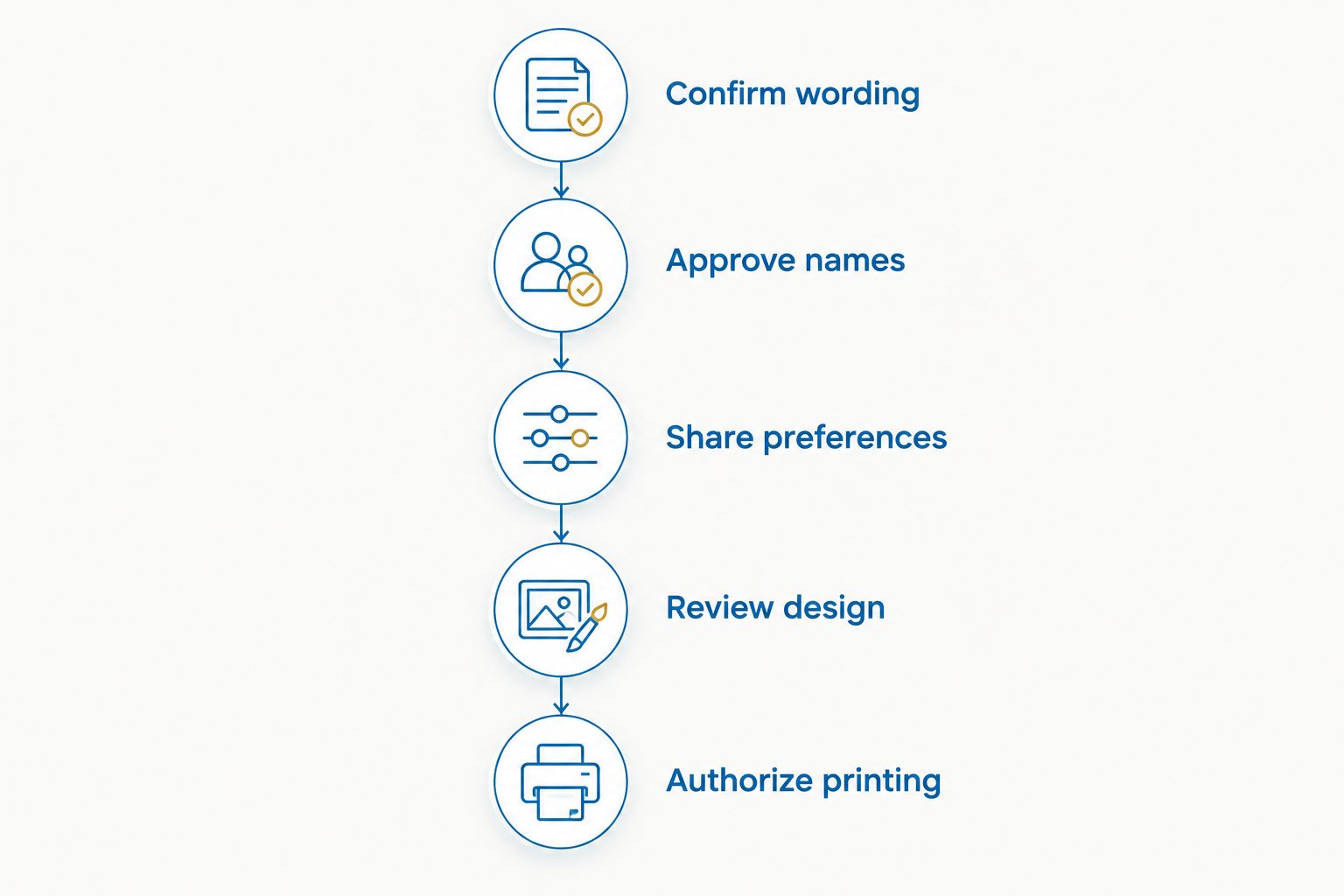
Use this sequence to organize the information and approvals on your side. It is an administrative checklist, not a requirement to become a designer.
- Confirm wording. Provide the institution name, certificate title, recognition wording, date, and signature names or titles that belong on the document.
- Approve names. Identify the authoritative recipient list and resolve spelling, punctuation, accents, and suffixes before sending approval.
- Share the options. Explain the look you want, whether you have an existing certificate to reference, and whether a cover is part of the presentation.
- Review design. Check the proof against your approved records, including both shared wording and recipient-specific information.
- Authorize printing. Have the designated school or program contact provide final approval after the information has been checked.
Our Art Team uses your information and preferences to develop the layout with you. Keep changes together so the reviewer can distinguish a current correction from an older instruction.
The no-obligation Work Order Request form is a helpful way to start that conversation. Our text and layout examples also give you a starting point if you know what the certificate should recognize but have not settled the wording.
Neither starting point requires you to solve the design yourself. Send what you know, describe your preferences, and let our Art Team work through the layout with you.
What should I check before approving personalized certificates?
Check the proof against an approved source, not against memory. A familiar school name or signature title can escape attention precisely because your reviewer expects it to be correct.
Separate the review into shared information and recipient information. This makes the responsibility clearer without asking your staff to inspect technical production settings.
Check the shared certificate wording
Review the institution name, certificate heading, program or award name, ceremony or completion date, and signature labels. Confirm that the wording describes what your institution is actually awarding.
If several programs share a ceremony, keep their certificate wording distinct where necessary. A common event does not mean every recipient receives the same credential or recognition.
Check each recipient's information
Compare names directly with the approved roster. Pay attention to accents, hyphens, spaces, initials, suffixes, and any recipient-specific distinction your institution has authorized.
When a name needs correction, send the exact replacement text rather than a general instruction to fix it. Your school remains the authority on the recipient information; our Art Team works with you on how that information appears.
Does the certificate holder change the decision?
The holder does not decide whether names should be personalized, but it does affect the document format you should discuss. Choose the certificate and presentation format together rather than assuming every holder fits the same sheet.
Our Series 300 certificate holders measure approximately 5 1/2 x 8 1/2 inches when closed and accommodate a folded standard sheet of paper. Series 850 diploma covers measure approximately 11 1/2 x 9 inches when closed and hold a standard 8 1/2 x 11-inch card stock diploma or certificate that is not folded. Our Series 500 diploma covers measure approximately 9 x 6 inches when closed and hold a card stock 5 1/2 x 8 1/2 sheet of paper.
For a larger document, our Series 1400 padded holders accommodate an unfolded 11 x 14-inch cardstock diploma or certificate. This format serves colleges, residency programs, technical programs and other institutional buyers who need the larger sheet.
Those are different presentation arrangements. Tell our Art Team which format you intend to use so the layout discussion starts with the right document and holder combination.
You do not need to calculate the fit yourself. If your organization already has covers, share the relevant information before the certificate design is approved. Our diploma sizes guide lists the common formats.
How should specialty programs handle recipient names?
Use the same name-approval process for specialty institutional certificates, but have the appropriate program authority confirm the credential wording. Many specialty programs graduate students throughout the year. This applies to administrators ordering military graduation certificates, police academy certificates, hospital residency diplomas, nursing diplomas, apprenticeship certificates, and church seminary and theological diplomas.
The printed document should reflect the institution's approved terminology. Do not substitute a familiar school phrase for a program title, degree name, or completion statement that carries a different meaning.
Keep this decision separate from visual design. Our Art Team helps with the layout and look; the issuing institution confirms what the document says and who receives it.
Your certificate printing decision at a glance
Order decision
- Choose personalized certificate printing when your school can approve the recipient roster before printing.
- Choose a Personalize-and-Print WORD template only when your office has a clear process for entering and checking names and dates.
- Graduation Ink’s Art Team develops the layout with you; your school supplies accurate information and reviews the design.
FAQ
Should I order certificates with names already printed?
Order personalized certificates when your institution can approve the recipient list before printing and you want a turn-key product ready to go. Your office then reviews the names within the certificate design instead of adding them afterward.
When does a Personalize-and-Print WORD template make sense?
A Personalize-and-Print WORD template makes sense when recipient names and dates remain unsettled. This is beneficial for schools that are trying to save on cost. There is no charge for the template: you are not paying for personalization and proofing by Graduation Ink, and you can order a couple of years at a time to get a bulk rate.
Do I need to design our school certificates myself?
No, Graduation Ink’s Art Team works directly with you to develop a layout and look that fits your needs. Send your accurate information and preferences, then review the design; you do not need to prepare print-ready artwork.
How early should I order certificates for our graduating class?
Our order lead time is 4-6 weeks, so for your 2026-2027 graduating class, order at least that long before the ceremony and finish your internal wording and roster review before ordering. We can complete certificates and diplomas in a shorter time frame; however, anything under 15 business days will likely include a rush charge.
Who should approve the names on personalized certificates?
The school or program contact responsible for the official recipient information should approve the names. Compare the proof with the approved roster, including accents, punctuation, initials, and suffixes.
Can we use the same certificate wording for different programs?
Use shared wording only when it accurately describes every program’s recognition. Have the appropriate program authority approve degree names, award titles, and completion statements before printing.
Should we choose certificate holders before approving the design?
Confirm the intended holder format before approving the certificate layout. Tell our Art Team whether the document will be folded or presented flat so the design discussion addresses the correct presentation.
One last thing
Leave a clear handoff, not an unexplained blank. If your office chooses a Personalize-and-Print WORD template, record who adds the names and dates and who checks the completed documents; if you choose personalization, record who approves the roster.
That small administrative decision belongs beside the ceremony date on your order checklist. It turns the choice between blank and personalized certificates into an assigned task rather than a last-minute question.
Related guides
- How to prepare a school logo for custom diploma covers
- Custom diploma covers: foil or full-color printing for your school
- Seminary diploma printing: checking degree names and wording
- Graduation Ink Series 300 diploma covers
- Diploma sizes