Current production time of two weeks or less for most orders. 

Seminary diploma printing: checking degree names and wording
Seminary diploma printing starts with approved degree wording. Check names, dates, and signer titles, then work with our Art Team on your diploma layout.

In Summary
- Match every degree name to your seminary’s approved academic records before approving the diploma wording.
- Check student names, conferral dates, institutional names, and signer titles separately from the overall design.
- Use sample diploma wording only as a starting point; your seminary must approve the final text.
- Keep degree diplomas, program certificates, and honorary awards separate so their wording reflects what your institution actually grants.
Seminary diploma printing is the preparation of personalized academic documents with the aim of accurately recording the credentials your institution confers. Seminary administrators must check theological degree titles, institutional wording, and academic authority—not just student names.
At Graduation Ink, we customize diploma printing to your requirements. This guide helps your registrar, academic office, and program coordinator agree on the wording before reviewing the finished layout.
Why seminary diploma printing matters for administrators
A diploma’s wording identifies the institution, the recipient, and the credential awarded. Treat the approved academic record as the source of truth, not a previous diploma or an attractive sample.
A church seminary and a theological school can use similar language while granting different credentials. A degree diploma, ministry training certificate, and honorary award should not become interchangeable simply because their designs look alike.
Separate academic decisions from presentation decisions. Your academic office confirms the credential and wording before approving the layout.
How to check seminary diploma names and wording
Establish the authoritative wording source
Start with the degree titles and institutional wording your seminary has formally approved. Use your current academic catalog, governing documents, or registrar’s records as appropriate to your institution, and resolve disagreements before sending wording for design.
An older diploma is useful as a reference, but it is not permission to repeat outdated information. A leadership change, renamed program, or revised institutional name deserves a fresh check.
Create a simple wording sheet in a document or spreadsheet. Keep the institution-wide language separate from information that changes for each graduate, so an edit to a student’s name does not accidentally change the degree title.
Close this step with a clear record:
- Record the approved institutional name exactly as it should appear.
- Copy each credential title from the approved academic source.
- Identify who has authority to resolve wording questions.
- Mark older samples as references rather than final instructions.
Separate degree titles from program descriptions
Check whether the program’s everyday name matches the formal credential. A department’s promotional wording, a concentration, and the actual degree title serve different purposes; do not combine them without academic approval.
Common theological degree names include Master of Divinity, Master of Arts, Master of Theology, and Doctor of Ministry. These examples are not a recommended list for your school: print only the title your institution is authorized to confer and has approved for that graduate.
The same care applies to abbreviations. Do not expand an abbreviation from memory, and do not assume that every institution punctuates or names a credential the same way.
Approve the full credential wording before discussing line breaks or type size. Do not shorten an academic title just to fit an older layout.
- Distinguish the degree title from the department name.
- Confirm whether a concentration belongs on the diploma.
- Check the approved spelling and punctuation of abbreviations.
- Keep certificate wording separate from degree wording.
Sample seminary diploma wording
Most seminary diplomas follow a similar pattern: the institution’s name, a statement of authority, the graduate’s name, the degree conferred, and the date and place. Here is a common structure to adapt with your own approved wording:
[Seminary Name]
The Board of Trustees, upon recommendation of the Faculty, has conferred upon
[Graduate Name]
the degree of
Master of Divinity
with all the rights, privileges, and honors thereto appertaining.
Given at [City, State] this [day] day of [Month], [Year].
A ministry certificate typically replaces “has conferred upon… the degree of” with wording such as “has satisfactorily completed the program in [Program Name].” Use this sample only as a starting point; your academic office should approve the final text. More examples are on our diploma design and wording ideas page.
Gather the wording for our Art Team
Begin with accurate information and a plain description of your preferences. You can identify wording you want to retain from an earlier diploma without rebuilding its design or preparing a finished file.
Graduation Ink’s Art Team works directly with you to develop a layout and look that fits your needs. Send the institutional name, approved credential wording, student information, signer details, and any preferences about the overall appearance.
Seminary diplomas are typically printed on our Series 1400 11 × 14 inch college diplomas or Series 850 8 1/2 × 11 inch college diplomas, with full-color printing included and raised ink or metallic foil options. Our no-obligation Work Order Request form is the easiest way to get started, or call us at 262-247-0343 to talk with a designer.
- Supply the approved wording in editable text.
- Identify any wording that must remain unchanged.
- Share an earlier diploma if it helps explain your preferences.
- Describe the appearance you want in everyday language.
- Flag unresolved academic questions before approving the design.
Verify each graduate’s record
Check student-specific information against the record your seminary uses for conferral. Do not treat a ceremony list, an informal email, or a preferred-name list as the final diploma record unless your institution has approved that use.
Pay attention to middle names, suffixes, accents, and spelling. If your institution permits a chosen name on the diploma, follow that policy consistently rather than deciding case by case during design review.
Graduates in the same ceremony can receive different credentials or have different conferral dates. Keep those distinctions visible in your working record so a shared layout does not turn into shared wording by mistake.
Give each record these checks:
- Confirm the diploma name against the approved student record.
- Match the recipient to the correct credential.
- Verify any approved concentration or distinction.
- Confirm the actual conferral date.
- Resolve incomplete records before final approval.
Review authority, dates, and signatures
Read the conferral sentence as an academic statement, not decorative text. Language about authority, completion, and the award itself should reflect your institution’s approved practice.
A ceremony date and a conferral date are different fields. If both appear, identify them clearly; if only one appears, confirm which date the diploma is intended to record.
Check signer names and titles independently. A title copied from an old diploma can be wrong even when the person’s name is unchanged, and a current officeholder is not automatically the correct signer for every historical replacement document.
Avoid adding accreditation claims, denominational endorsements, professional standing, or licensing language simply to make the diploma sound more formal. Print those statements only when your institution has confirmed both their accuracy and their use on the document.
- Approve the exact conferral sentence.
- Distinguish the academic award date from the ceremony date.
- Verify every signer’s name and office title.
- Confirm any institutional authority statement.
- Remove claims your academic office has not approved.
Review the design in separate passes
Review the wording first, then the appearance. Reading everything at once makes it easy to admire the design while overlooking a missing word in a degree title.
Use a text pass to compare the design with your approved wording sheet. Then use a presentation pass to check readability, emphasis, and the relationship between the diploma and its cover.
We email a PDF or JPG soft proof for review and edits before printing new diploma orders or reorders with new signature lines or logos. Check the wording and appearance, request corrections, and approve the proof before production.
Keep corrections together in a single, clearly identified response. If several staff members review the design, assign one person to reconcile their comments before sending changes.
- Compare every line against the approved wording.
- Check student information separately from shared text.
- Confirm that the credential remains easy to read.
- Combine reviewer corrections before returning feedback.
- Record which version received final institutional approval.
The review sequence is straightforward: approve the credential, verify the recipient, then review the presentation. A polished design does not replace an academic check.

Compare seminary document and presentation options
Choose the document by what your seminary is recognizing, then choose a compatible presentation format. A cover changes the presentation, not the meaning of the credential inside.
Browse all diploma covers to see styles and imprint options.
Browse real customer designs, font styles, and wording ideas by diploma size:
- Series 1400 diploma design and wording examples (11 × 14 inches)
- Series 850 diploma design and wording examples (8.5 × 11 inches)
These examples show presentation possibilities, not wording approved for your institution. Use your seminary’s own approved degree names and conferral language.
College diploma sheets for seminary orders
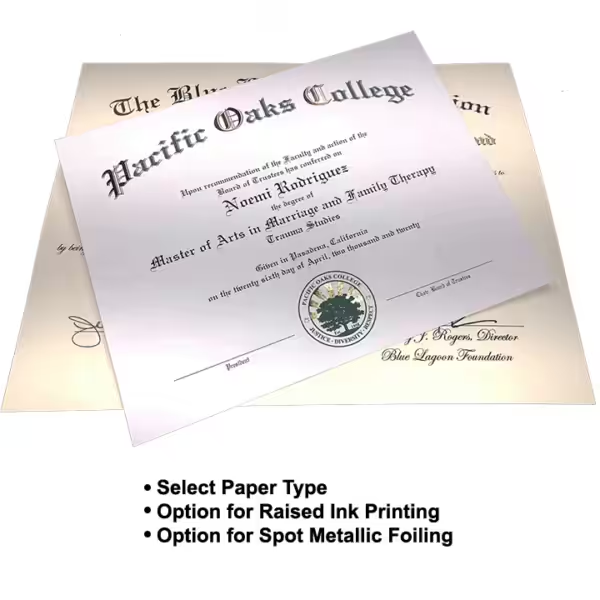
Series 1400: 11 × 14 inch diploma sheets with full-color printing; raised ink and spot metallic foil options.
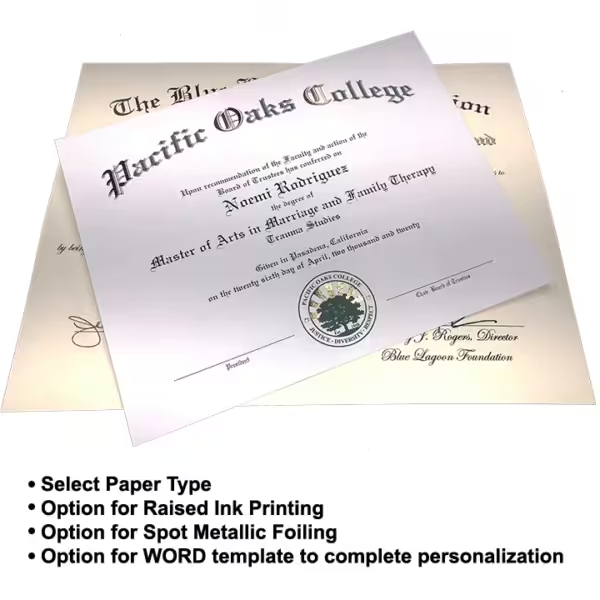
Series 850: 8.5 × 11 inch diploma sheets with full-color printing; raised ink and spot metallic foil options.
| Option | Best for | Main benefit | Key limitation |
|---|---|---|---|
| Degree diploma | Graduates receiving an approved academic degree | States the specific credential conferred | Requires confirmed degree wording and recipient eligibility |
| Program completion certificate | Participants completing a non-degree program | Recognizes the program without calling it a degree | Must not imply a degree your institution has not awarded |
| Honorary award document | Recipients of an institutionally approved honorary distinction | Identifies the intended recognition | Needs wording that clearly distinguishes it from an earned credential |
| Series 850 college diploma sheet | Approved degrees on an 8.5 × 11 inch document | Full-color printing; raised ink and foil options | Requires a cover sized for an 8.5 × 11 inch sheet |
| Series 1400 college diploma sheet | Approved degrees on an 11 × 14 inch document | Larger sheet; full-color printing, raised ink and foil options | Requires a cover sized for an 11 × 14 inch sheet |
| Series 850 diploma cover | Presenting an 8 1/2 × 11 inch diploma or certificate | Holds a full-size document in a padded cover | Does not fit every diploma format |
| Series 1400 diploma holder | Presenting an 11 × 14 inch diploma | Accommodates a larger document | Requires a matching document size rather than a smaller-format assumption |
Every cover collection lists the document size each cover holds, so filter by Series 850 or Series 1400 first, then choose an imprint style.
Wording checkpoints
- Confirm signer names and titles against current records, not an old diploma.
- Approve theological degree names before reviewing diploma layout or certificate wording.
- Match every graduate to the correct credential and conferral date.
- Choose diploma covers by document size, not by the cover’s outside dimensions.
Common mistakes seminary administrators make
Copying a degree title from another institution
Another seminary’s diploma can provide visual inspiration, but its credential wording belongs to that institution. Use your own approved degree name, including any authorized concentration or designation.
Treating every ministry program as a degree
A ministry course, theological training program, or church leadership program does not become a degree because its certificate uses formal language. Name the achievement accurately before choosing the document’s heading.
Reusing old authority and signer wording
A previous diploma can carry an outdated institutional name, office title, or conferral statement. Check those fields even when the layout remains unchanged; familiarity is not verification.
Sending conflicting corrections
Several reviewers can spot different issues, but separate emails can leave contradictory instructions. Assign one coordinator to combine corrections and identify the final approved version.
FAQ
What should a seminary diploma say?
A seminary diploma should identify the institution, recipient, approved credential, and conferral date using wording authorized by the institution. A common format reads: “[Seminary Name]… has conferred upon [Name] the degree of [Degree]… Given at [City, State] this [date].” Include signer names, titles, and authority statements only after your academic office has checked them.
Should we print the full theological degree name or its abbreviation?
Use the form your seminary has approved for diplomas. Check the exact full title or abbreviation against your academic records rather than expanding or shortening it from memory.
Can a ministry completion certificate use the same wording as a degree diploma?
A ministry completion certificate should describe the actual program achievement rather than imply an unawarded degree. Keep degree conferral language separate from non-degree completion wording.
Do we need to design our seminary diplomas ourselves?
No. Send your approved wording, student information, and design preferences. We prepare the layout for your review.
Should the diploma show the ceremony date or the conferral date?
Print the date your institution has approved for the diploma’s purpose. A ceremony date and a conferral date are different, so confirm the intended date with the office responsible for academic records.
Can we use our previous seminary diploma as a reference?
Yes, an earlier diploma can help explain your preferred appearance and wording. Recheck degree names, institutional names, signer titles, and authority statements before treating any of its text as current.
How do we choose a cover for a seminary diploma?
Choose a cover that matches the diploma sheet size and intended presentation. The listed Series 850 covers hold an 8 1/2 × 11 inch document, while the listed Series 1400 holders accommodate an 11 × 14 inch document. Browse the cover collections by imprint style — blanks, custom text foiling, custom foiled logo, or full color — then confirm the document size a cover holds before ordering.
How long does seminary diploma printing take?
Most orders are produced in two weeks or less after proof approval. Allow extra time for your academic office to confirm wording, and order well ahead of commencement.
One last thing
Read the credential line aloud without looking at the design. If the words do not match the academic record on their own, a more formal typeface or institutional seal will not make them correct.
Keep the final approved wording with your institution’s order records. Next season’s administrator should be able to distinguish approved academic language from a design reference without reconstructing the decision from email comments.
Related guides
- Prepare a school logo for custom diploma covers
- Compare foil and full-color printing for diploma covers
- Artwork preparation guidance for certificate printing
About the author: Jesse Kremer
Jesse Kremer is a third-generation printer continuing his family’s tradition of excellent service to business, church, and school customers.